TTRPG Stream Overlay Pack – Dungeon Master for Twitch
Fantasy / RPG

TTRPG Stream Overlay Pack – Dungeon Master for Twitch

4.6/5 · 9 selected reviews (2–5 stars)
$17.99Tax included

Save more: any 2 packs −15%, any 3 or more −25%. Applied automatically at checkout.

  • Broken file, we fix it or refund it. If a download fails or a file is corrupted, tell us within 14 days.
  • Setup help included. Stuck in OBS? Read the 5-minute guide or just ask.
  • A real person answers. Mohamed designs every pack here and reads every message.

Downloads are final once delivered. Full policy

What's inside

  • 47 media files + PDF installation guide; animated and static versions counted separately
  • 4 stream screens: Starting Soon, Be Right Back, Stream Ending and Offline — animated MP4 + static JPG (1920 × 1080)
  • 4 alerts: Follower, Subscriber, Donation and Raid — MP4 with embedded audio + static JPG (1920 × 1080)
  • 22 Twitch panel PNGs (320 × 100), including About, Schedule, Rules, Donate and Discord
  • Webcam frame: transparent animated WEBM + transparent static PNG (1920 × 1080)
  • Just Chatting layout: animated WEBM + static PNG, both with a transparent camera window (1920 × 1080)
  • Gameplay overlay PNG with a transparent center (1920 × 1080)
  • Chatbox decoration PNG (700 × 800); live chat widget not included
  • Stinger transition MP4 (2.5 seconds) + JPG reference image (1920 × 1080)
  • Twitch banner JPG (1200 × 480)

OBS / Streamlabs / StreamElements · Original audio · No copyrighted content · Instant download

The details

Description

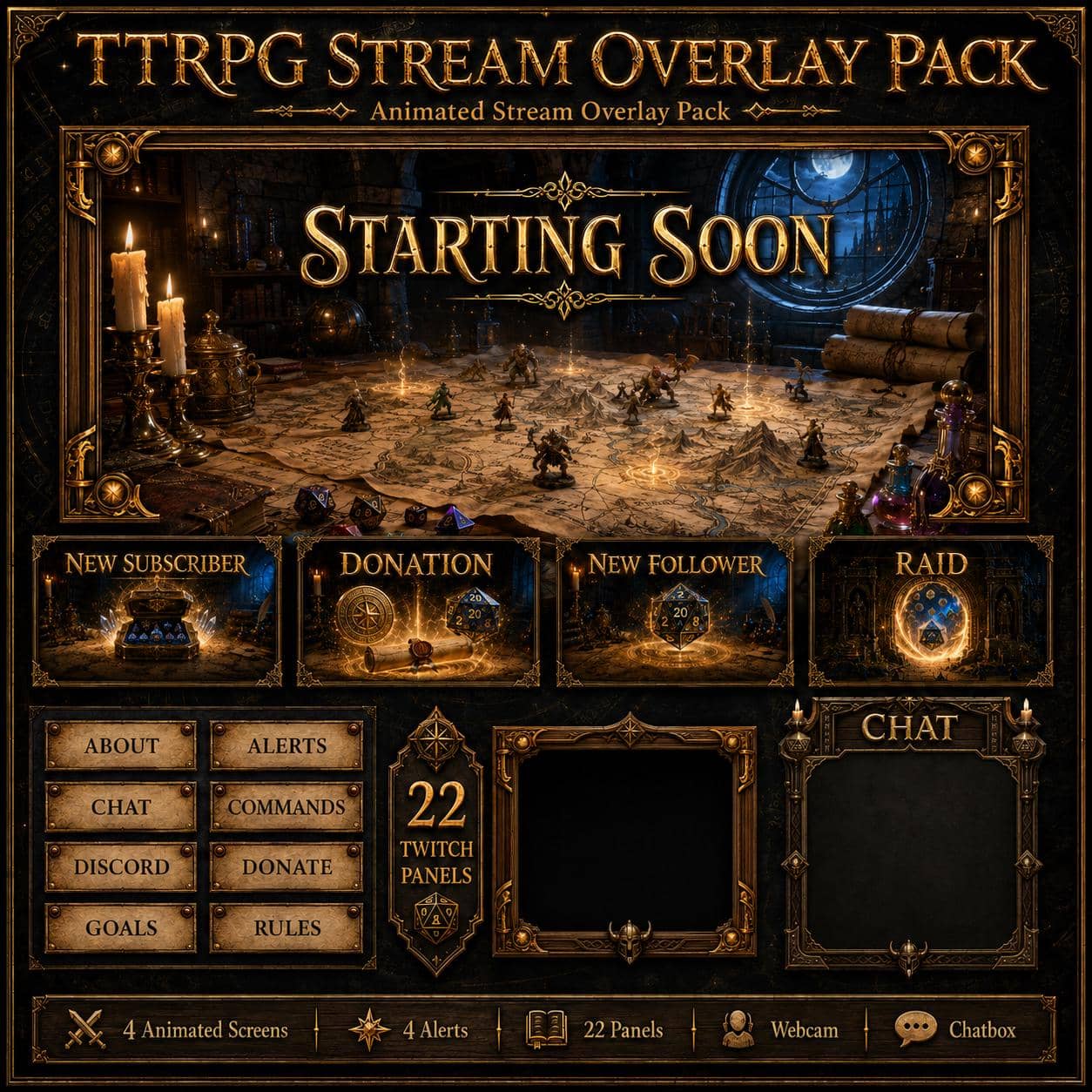
Dungeon Master is a TTRPG stream overlay pack for Twitch, set around a candlelit campaign table. Parchment maps, polyhedral dice, miniatures and spellbooks fill a stone-walled study, with gold borders and a blue, moonlit round window. The focus is the game master's table and its fantasy props, rather than a tavern bar or a generic gaming room.

For D&D and other fantasy tabletop RPG actual-play streams, use the Starting Soon screen while your group gets ready, the BRB screen between encounters, and the Ending or Offline screen after the session. For a campaign introduction, session recap or conversation with viewers, the Just Chatting layout pairs one camera window at the lower left with a tall chat column on the right. It is a single-camera composition, not a pre-arranged grid of player cameras. Watch the two preview videos above to check the artwork and animation.

What comes with the Dungeon Master pack

  • Four stream screens: Starting Soon, Be Right Back, Stream Ending and Offline. Each includes an animated MP4 and a static JPG, all 1920 × 1080.
  • Four alerts: Follower, Subscriber, Donation and Raid. Each includes an MP4 with embedded audio and a static JPG, all 1920 × 1080. These are standard MP4 videos, not transparent alpha WEBM alerts; separate WAV sound files are not included.
  • 22 Twitch panel PNGs, 320 × 100: About, Alerts, Chat, Commands, Contact, Discord, Donate, Events, FAQ, Goals, Links, Merch, Mods, Music, Reviews, Rules, Schedule, Setup, Socials, Sponsors, Subscribe and Tips.
  • Webcam frame: a transparent animated WEBM and a transparent static PNG, 1920 × 1080.
  • Just Chatting layout: an animated WEBM and a static PNG, 1920 × 1080. Both have a transparent camera window; the chat column keeps its dark background.
  • Gameplay overlay: a PNG with a transparent center, 1920 × 1080.
  • Chatbox decoration: a PNG, 700 × 800, with a dark interior. A live chat widget is not included.
  • Stinger transition: an MP4, 2.5 seconds, and a JPG reference image, 1920 × 1080. The JPG is a still image, not a playable transition.
  • Twitch banner: a JPG, 1200 × 480. A YouTube banner is not included in the current download.
  • PDF installation guide.

The ZIP contains 47 media files plus the guide. Animated and static versions of the same designs are counted separately. The maps, miniatures and dice are part of the artwork: this is stream decoration, not a virtual tabletop, playable battle map or interactive dice roller.

Build your tabletop RPG scene in OBS

  1. Extract the ZIP to a permanent folder. Add screens/starting_soon.mp4 as a Media Source in your Starting Soon scene and enable Loop. Repeat for the other waiting screens, or add the matching JPG as an Image source for a static scene.
  2. Add your camera, then place extras/webcam_frame_alpha.webm above it as a looping Media Source. For a fixed frame, use extras/webcam_frame.png as an Image source. The transparent center lets your video show through.
  3. For Just Chatting, layer extras/just_chatting_alpha.webm or extras/just_chatting.png above your camera and position the camera within the lower-left window. Add a separate chat widget or browser source above the layout's dark chat column. For game footage or a virtual-tabletop capture, use extras/gameplay_overlay.png above the capture instead.
  4. Upload the 22 panel PNGs through your Twitch channel's panel editor. Configure follower, subscriber, donation and raid triggers in your chosen alert service; the pack supplies the media, not the event connections. Follow our OBS overlay installation guide for the scene-building workflow.

You arrange these ready-made media files in OBS yourself. No editable design project, multi-camera scene collection or one-click OBS import is included. For a group broadcast, add and arrange each participant's video source separately. The composed visuals can be used while streaming to Twitch, YouTube or Kick, but alert-event and channel-panel support depends on the platform and service you use.
Customer feedback

Selected customer reviews

4.6

Average of 9 selected reviews (2–5 stars)

This average covers selected published reviews rated 2 to 5 stars only. One-star reviews are excluded; this is not the overall customer rating.

The seller is awesome and responsive. It was also technically easy to setup for my stream. However, I have a firm anti-AI stance on my channel and the assets from this were AI generated. This was frustrating as the item description didn't state this.

Nicholas · 12 Sept 2026

Nice artwork and easy to use.

Josh · 07 Aug 2026

Très bien en superposition par rapport au thème de mes streams, ça rajoute un cachet en lien avec les jeux que je n'avais pas auparavant. Merci !

Charline · 07 Jul 2026

Overall, this was an excellent purchase for this price point. The instructions for downloading and use were perfect and easy to follow, and the shop was very proactive about assisting if help was needed (though it was not, thanks to the included guides and instruction). There is some AI hallucination in a few of the mp4s, but again I'll iterate that for this price point this package of items was well worth it. Thank you for an excellent and very affordable product!

Luke · 14 Jun 2026

Beautifully made perfect for my DND streams

Danielle · 07 May 2026

Purchased this overlay, few issues with the looping videos but a quick response from the seller and a perfect fix. 10/10 would reccomend

Joe · 04 May 2026

Very helpful and even contacted about a product upgrade.

Niko · 04 May 2026

The items were quality. Initially there were a couple inconsistencies and had trouble with one of the video loops. However, the seller was very response and super kind. He worked with me to fix things and went above and beyond expectations. I would recommend them for anyone wanting some unique stream setups with clear functioning items.

Kaila · 15 Apr 2026

Fantastic overlay for my twitch, easy enough to add to OBS and Streamelements, thank you :)

InquisiPebs · 15 Mar 2026

Good to know

Frequently asked questions

Does Dungeon Master include static and animated versions?+

Yes. All four waiting screens and four alerts include an MP4 and a matching static JPG. The webcam frame and Just Chatting layout each include an animated WEBM and a static PNG. The stinger includes an MP4 and a JPG reference image; only the MP4 plays a transition.

Is this a multi-player OBS scene collection or a virtual tabletop?+

No. This is a set of stream media files to arrange in OBS, not a virtual tabletop or a one-click scene-collection import. The Just Chatting layout has one camera window at the lower left and a chat column on the right, not a ready-made grid of player cameras. Maps and dice in the artwork are decorative, not playable or interactive.

Which files are transparent, and how do I add live chat?+

The webcam WEBM and PNG, the camera window of both Just Chatting files and the center of the gameplay PNG support transparency. The Just Chatting chat column and chatbox decoration have dark interiors. Add your own chat widget or browser source above those areas. The JPG screens and standard MP4 alerts do not have alpha transparency.

Do the alerts include sound and automatic triggers?+

The four alert MP4 files contain embedded audio. There are no separate WAV files in the download. Configure the follower, subscriber, donation and raid triggers, dynamic names and messages in your chosen alert service. The media files do not connect themselves to your channel events.

Can I use this pack on Twitch, YouTube or Kick?+

You can compose the visuals in OBS before broadcasting to your platform. Alert-event support depends on the platform and alert service you use. The 22 panels and the included banner are intended for Twitch; the current download does not include a YouTube banner.

How do I receive the files after purchase?+

Delivery is instant and digital. Right after checkout you get a secure download link by email and in your account - no waiting and no shipping.

Can I get a refund?+

Because the products are digital and delivered instantly, all sales are final. If a file is corrupted or a download genuinely fails, contact us within 14 days and we'll fix it or, at our discretion, issue a refund.

You might also like

Related packs