โˆ’25% off everything
Cyberpunk Overlay Pack | Animated Neon City Futuristic Twitch Stream Screens Alerts Panels
Cyberpunk / Neon

Cyberpunk Overlay Pack | Animated Neon City Futuristic Twitch Stream Screens Alerts Panels

5.0 (4 reviews)
$13.49$17.99โˆ’25%Tax included

What's inside

  • ๐Ÿ“ฆ 50+ Elements Included
  • ๐Ÿ–ฅ๏ธ 5 Animated Stream Screens (1920x1080 static preview + MP4)
  • Starting Soon - Neon rain-soaked cyberpunk street
  • Be Right Back - Neon ramen shop in a dark futuristic alley
  • Stream Ending - Cyberpunk city atmosphere with glowing skyline energy
  • Offline - Neon city rooftop / skyline scene
  • ๐Ÿ’ฌ Animated / static Just Chatting overlay with alpha transparency - ready for OBS
  • ๐Ÿ”” 4 Animated Alerts (1920x1080 JPG + MP4)
  • New Follower
  • New Subscriber
  • Donation
  • Raid
  • ๐Ÿ’ฌ Animated / static Just Chatting overlay with alpha transparency - ready for OBS
  • Animated WEBM alpha overlay - no chroma key needed
  • ๐Ÿ’ฌ Animated / static Just Chatting overlay with alpha transparency - ready for OBS
  • ๐ŸŽฎ Gameplay Overlay (1920x1080 PNG)
  • Transparent gameplay overlay with cyberpunk neon frame details
  • ๐Ÿ“น Webcam Frame
  • PNG webcam frame
  • WEBM alpha webcam frame - no chroma key needed
  • ๐Ÿ’ฌ Chatbox Overlay (PNG)
  • Matching cyberpunk chatbox background
  • ๐Ÿ“Š 22 Stream Panels (320x100 PNG)
  • About, Schedule, Rules, Discord, Donate, Subscribe, Social, FAQ, Commands, Alerts, Stream Setup, Goals, Chat Rules, Music, Merch, Sponsors, Tips, Follow, YouTube, Twitter, Instagram, TikTok
  • ๐ŸŽฌ 1 Stinger Transition (1920x1080 MP4)
  • Cyberpunk neon transition for scene changes
  • ๐Ÿ–ผ๏ธ 2 Channel Banners
  • Twitch Banner - 1200x480 JPG
  • YouTube Banner - 2560x1440 JPG
  • ๐Ÿ“– Installation Guide (PDF)
  • Step-by-step OBS / Streamlabs / StreamElements setup instructions

OBS / Streamlabs / StreamElements ยท Original audio ยท No copyrighted content ยท Instant download

The details

Description

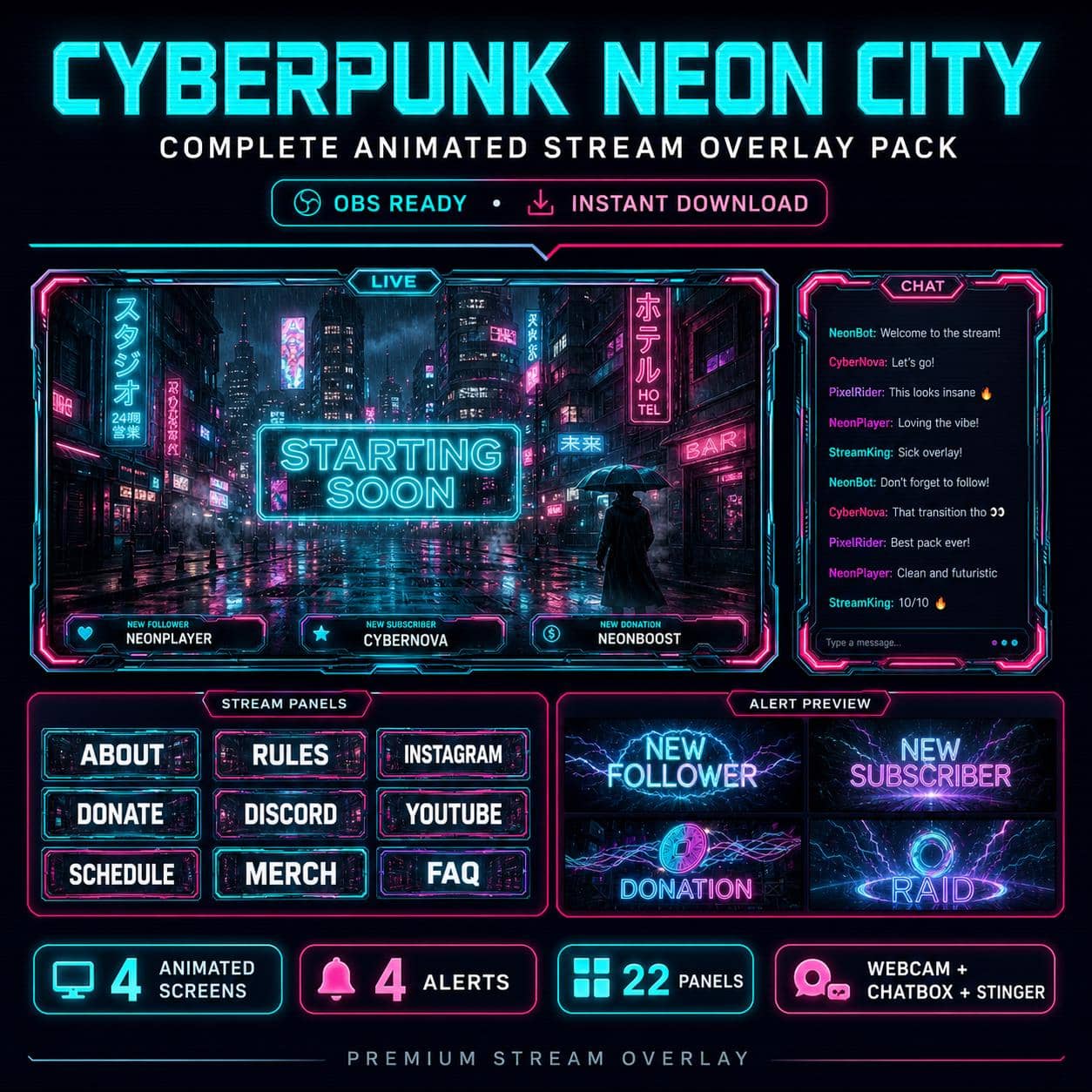
Drop your viewers straight into a rain-soaked neon city. This cyberpunk overlay turns your channel into a futuristic sci-fi world of glowing signs, holographic billboards and wet asphalt reflections - a cohesive look built to make your stream feel like a AAA game intro. It's a complete, ready-to-go setup, so you don't design anything yourself: everything matches, from the animated screens down to the panels.

What you get (32+ elements):

  • 4 animated screens - Starting Soon, Be Right Back, Stream Ending and Offline, each a looping MP4 of a neon-drenched street.
  • 4 animated alerts with sound - Follower, Subscriber, Donation and Raid, so every new supporter gets a proper on-screen moment.
  • 1 cyberpunk webcam frame to sit your camera neatly inside the theme.
  • 22 matching Twitch panels (About, Schedule, Donate, Socials and more).
  • 1 stinger transition for clean, cinematic scene switches.
  • A beginner-friendly PDF install guide for OBS, Streamlabs and StreamElements.

Perfect for:

This neon aesthetic is a natural fit for fast-paced FPS and competitive streamers. It looks right at home on Valorant, Apex Legends, Call of Duty and Counter-Strike 2 channels, where a sharp, high-tech vibe matches the energy of the gameplay. It's just as strong for Cyberpunk 2077, Warframe and other sci-fi titles, and it gives VTubers, music/DJ streamers and "just chatting" creators a bold, modern identity. If your brand is dark, neon and futuristic, this is your pack.

Why it works:

A matching cyberpunk theme across every scene makes your channel instantly recognisable - and your VODs and clips look professionally produced instead of thrown together. Cohesive branding is one of the quickest ways to look bigger than you are and turn first-time viewers into followers.

New to overlays? Grab a free pack first to see how it feels on your own stream before you upgrade.

Loved by streamers

Customer reviews

5.0

Based on 4 reviews

Love the Overlay package! Its very high quality!

Zachary ยท 20 Jul 2026

Looks great. Can't wait to use it.

Joseph ยท 08 Jul 2026

The best quality and esy to install

Stefan ยท 01 Jun 2026

The quality of the overlays are so clear and vivid. Exceeded my expectations fully! Transitions between overlays flow very smoothly as well.

M ยท 30 May 2026

Good to know

Frequently asked questions

Does this overlay work with OBS, Streamlabs and StreamElements?+

Yes. Every NeonStreamLab pack works with OBS Studio, Streamlabs and StreamElements. The animated screens are standard MP4/PNG files and the alerts work as browser sources, so they drop straight into your software with no plugins required.

How do I install the overlay?+

It takes about five minutes. Unzip the pack, then in OBS add each screen as a Media Source (or Image), position your webcam frame, upload the panel images to your channel, and set up the alerts in Streamlabs or StreamElements. A step-by-step PDF guide is included with every pack.

Can I use this overlay on Twitch, YouTube and Kick?+

Yes. The pack is fully compatible with Twitch, YouTube Live and Kick, as well as Facebook Gaming. The same files work across every platform.

Is the audio copyright-free? Will I get a DMCA strike?+

All audio is original and copyright-free, so you won't get DMCA strikes or muted VODs from using the alert sounds. No third-party music or copyrighted content is included.

How do I receive the files after purchase?+

Delivery is instant and digital. Right after checkout you get a secure download link by email and in your account - no waiting and no shipping.

Can I get a refund?+

Because the products are digital and delivered instantly, all sales are final. If a file is corrupted or a download genuinely fails, contact us within 14 days and we'll fix it or, at our discretion, issue a refund.

You might also like

Related packs