20% off everything
Wolf Twitch Overlay Pack | Dark Nordic Forest Stream Screens Alerts Panels Youtube Kick
Viking / Nordic

Wolf Twitch Overlay Pack | Dark Nordic Forest Stream Screens Alerts Panels Youtube Kick

€13.12€16.4020%VAT added at checkout

What's inside

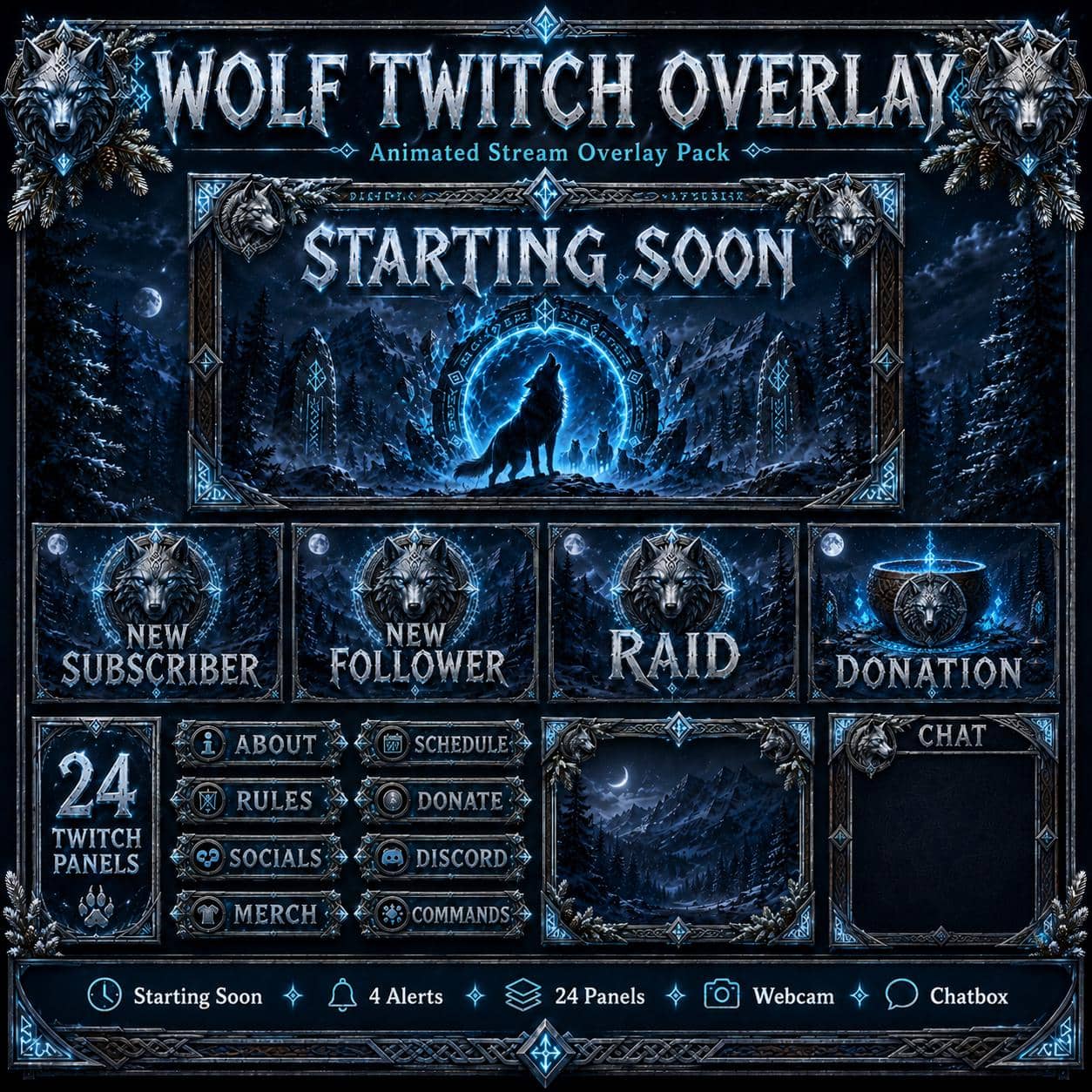
  • 4 animated screens 1920x1080 MP4 (+ 4 static JPG)
  • 4 animated alerts (follower, sub, donation, raid)
  • Webcam frame PNG + animated WEBM alpha version
  • Chatbox overlay (700x800) + Just Chatting scene
  • Matching Twitch panels + banners
  • Stinger transition

OBS / Streamlabs / StreamElements · Original audio · No copyrighted content · Instant download

The details

Description

Lead the pack. The wolf Twitch overlay turns your stream into a moonlit Nordic wilderness — snow-dusted pines, carved runestones, engraved metal and a lone wolf presence lit by icy cyan magic. Cinematic, cold and quietly powerful.

What you get

Four animated screens in seamless 1080p loops (plus static versions), four animated alerts, a webcam frame in both PNG and animated WEBM alpha, a chatbox, a Just Chatting scene, matching panels, banners and a stinger transition. One download, one identity — everything drops straight into OBS, Streamlabs or StreamElements.

Perfect for

Built for streamers who live in the north: Valheim base-builders, God of War and Assassin's Creed Valhalla players, Skyrim veterans and dark-fantasy RPG channels. It also suits variety streamers who want a serious, wild aesthetic without going full horror.

Why it works

Wolf imagery is one of the most-searched stream aesthetics, but most wolf overlays look like clip-art. This one plays it cinematic — muted midnight blues, silver light and restrained animation — so your face-cam and gameplay stay the heroes.

Try the cohesive-set effect first with a free overlay pack, then give your channel its wolf.

Good to know

Frequently asked questions

Does this overlay work with OBS, Streamlabs and StreamElements?+

Yes. Every NeonStreamLab pack works with OBS Studio, Streamlabs and StreamElements. The animated screens are standard MP4/PNG files and the alerts work as browser sources, so they drop straight into your software with no plugins required.

How do I install the overlay?+

It takes about five minutes. Unzip the pack, then in OBS add each screen as a Media Source (or Image), position your webcam frame, upload the panel images to your channel, and set up the alerts in Streamlabs or StreamElements. A step-by-step PDF guide is included with every pack.

Can I use this overlay on Twitch, YouTube and Kick?+

Yes. The pack is fully compatible with Twitch, YouTube Live and Kick, as well as Facebook Gaming. The same files work across every platform.

Is the audio copyright-free? Will I get a DMCA strike?+

All audio is original and copyright-free, so you won't get DMCA strikes or muted VODs from using the alert sounds. No third-party music or copyrighted content is included.

How do I receive the files after purchase?+

Delivery is instant and digital. Right after checkout you get a secure download link by email and in your account — no waiting and no shipping.

Can I get a refund?+

Because the products are digital and delivered instantly, all sales are final. If a file is corrupted or a download genuinely fails, contact us within 14 days and we'll fix it or, at our discretion, issue a refund.

You might also like

Related packs