Sakura Twitch Overlay Pack – Pink Cherry Blossom Theme
Cute / Kawaii

Sakura Twitch Overlay Pack – Pink Cherry Blossom Theme

5.0/5 · 10 selected reviews (2–5 stars)
$17.99Tax included

Save more: any 2 packs −15%, any 3 or more −25%. Applied automatically at checkout.

  • Broken file, we fix it or refund it. If a download fails or a file is corrupted, tell us within 14 days.
  • Setup help included. Stuck in OBS? Read the 5-minute guide or just ask.
  • A real person answers. Mohamed designs every pack here and reads every message.

Downloads are final once delivered. Full policy

What's inside

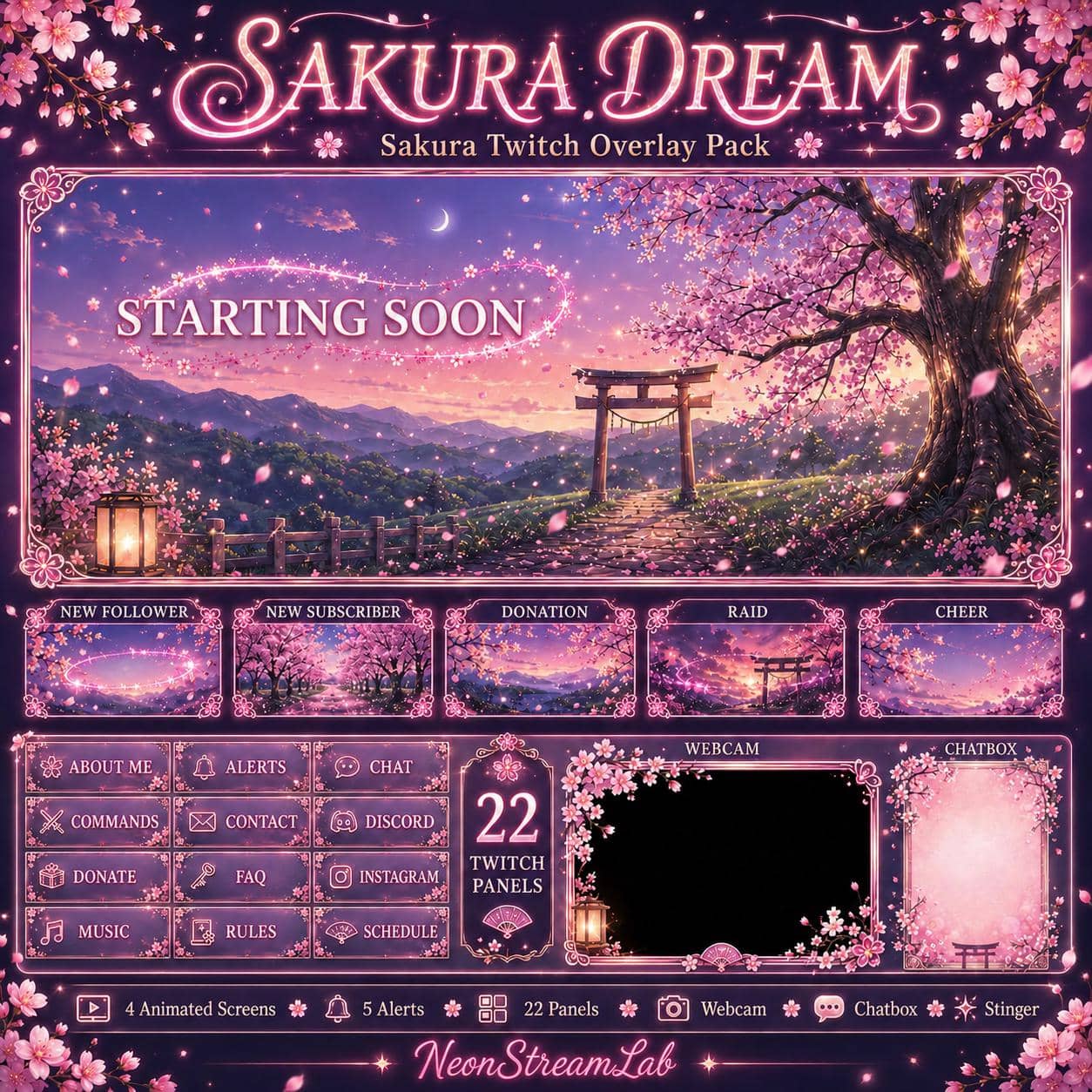
  • 4 stream screens: Starting Soon, Be Right Back, Stream Ending and Offline
  • 4 animated MP4 screens (1920 × 1080) + 4 static JPG screens (1376 × 768)
  • 5 animated MP4 alerts: Follower, Subscriber, Donation, Raid and Cheer (1920 × 1080)
  • 22 Twitch panel PNGs (320 × 100)
  • Just Chatting layout: static PNG + animated transparent WEBM (1920 × 1080)
  • Animated transparent webcam frame WEBM (1920 × 1080)
  • Chatbox decoration PNG (700 × 1050; live chat widget not included)
  • Stinger transition MP4 (1280 × 720)
  • PDF installation guide

OBS / Streamlabs / StreamElements · Original audio · No copyrighted content · Instant download

The details

Description

Sakura is a pink cherry blossom Twitch overlay pack with animated stream screens, floral webcam and chat layouts, and matching channel panels. Its Japanese-inspired Starting Soon scene pairs a flowering cherry tree and torii gate with a pastel evening sky.

Choose Sakura if you want a soft, kawaii look for cozy gaming, art streams or Just Chatting. Use the full-screen scenes before the stream, during breaks and at the end, then switch to the floral conversation layout when your camera and chat take the focus. Watch the preview videos above to check the artwork and motion before choosing the pack.

What you receive

  • Four stream screens, each in two formats: Starting Soon, Be Right Back, Stream Ending and Offline. Animated MP4 files are 1920 × 1080; static JPG alternatives are 1376 × 768.
  • Five animated MP4 alerts, 1920 × 1080: Follower, Subscriber, Donation, Raid and Cheer.
  • 22 Twitch panel PNGs, 320 × 100: About Me, Alerts, Chat, Commands, Contact, Discord, Donate, FAQ, Follow, Instagram, Merch, Music, PC Specs, Rules, Schedule, Socials, Stream Labels, Subscribe, TikTok, Tips, Twitter and YouTube.
  • Just Chatting layout: a static PNG and an animated transparent WEBM, both 1920 × 1080.
  • Animated webcam frame: a transparent WEBM, 1920 × 1080.
  • Chatbox decoration: a PNG, 700 × 1050.
  • Stinger transition: an MP4, 1280 × 720.
  • PDF installation guide.

Add Sakura to OBS

  1. Extract the ZIP to a permanent folder. In your Starting Soon scene, add screens/starting_soon.mp4 as a Media Source and enable Loop. Repeat for your other animated screens. For the JPG alternatives, use an Image source instead.
  2. Add your camera, then place extras/webcam_frame_alpha.webm above it in the Sources list. Use a Media Source with Loop enabled and align the camera with the frame opening.
  3. Add the Just Chatting PNG as an Image, or its WEBM version as a looping Media Source. Position your camera and chat sources beneath the decorative layout where appropriate.
  4. Upload the panel PNGs through your Twitch channel's panel editor. Panels are channel-page images, not OBS scene sources.

For the general workflow, see our OBS overlay installation guide.

Before you buy

Does the chatbox include live chat?
No. It is a decorative image. Live messages require a separate chat widget or browser source. The alert videos are visual assets; automatic follower, subscriber and donation triggers must be configured separately in your alert service.

Is this a one-click scene collection?
No. You receive ready-made media files to add to your scenes, not an OBS scene-collection import or editable design project.

Can I use the visuals when streaming to YouTube or Kick?
You can compose the visuals in OBS before broadcasting. Alert-event support and channel-panel features depend on the platform and service you use; the included panel set is labelled for Twitch.
Customer feedback

Selected customer reviews

5.0

Average of 10 selected reviews (2–5 stars)

This average covers selected published reviews rated 2 to 5 stars only. One-star reviews are excluded; this is not the overall customer rating.

i really love this. its match my new badges and mohamed help me out how to fix it amazing customer service 10/10

Tavane' · 03 Jun 2026

What a wonderful purchase. Helped me out a lot!

Amanda · 01 Jun 2026

This overlay is perfect I love it

Sign in with Apple user · 01 Jun 2026

I really like it thanks

Sakura · 01 Jun 2026

Amazing Work. Im in love with it.

B · 25 May 2026

I love this and I can't wait to put it to good use. Thank you for making a good product I can love.

Jackie · 26 Apr 2026

Beautifully made. The seller was extremely quick to reply when I needed assistance and went above and beyond!

Diane rivera · 22 Apr 2026

Great Quality And Quick Delivery

April · 17 Apr 2026

Very cute for my Twitch channel. Fast delivery as well! Thank you.

Bianca Ruiz · 02 Apr 2026

Mega schönes Overlay genau das richtige was ich gesucht habe

Kampfkeks · 26 Mar 2026

Good to know

Frequently asked questions

How do I install Sakura in OBS?+

Extract the ZIP, then add animated MP4 or WEBM files as Media Sources. Enable Loop for screens and the webcam frame. Add JPG or PNG files as Image sources. Place the webcam frame above your camera in the Sources list. The installation steps on this page link to our OBS guide.

Are static and animated screens included?+

Yes. Starting Soon, Be Right Back, Stream Ending and Offline each have an animated MP4 and a static JPG version. The Just Chatting layout includes a static PNG and an animated transparent WEBM.

Does the chatbox include live chat and automatic alerts?+

The chatbox is a decorative image. Live messages need a separate chat widget or browser source. The five alert videos are media assets; automatic event triggers must be configured in your alert service. This is not a one-click OBS scene-collection import.

Can I use Sakura when streaming to YouTube or Kick?+

You can compose the visuals in OBS before broadcasting. Alert-event support and channel-panel features depend on the platform and service you use. The included panel set is labelled for Twitch.
How do I receive the files after purchase?+

Delivery is instant and digital. Right after checkout you get a secure download link by email and in your account - no waiting and no shipping.

Can I get a refund?+

Because the products are digital and delivered instantly, all sales are final. If a file is corrupted or a download genuinely fails, contact us within 14 days and we'll fix it or, at our discretion, issue a refund.

You might also like

Related packs