A medieval stream overlay is a cohesive set of graphical and animated assets designed to give your stream a rich, immersive medieval aesthetic, covering webcam frames, panels, alerts, banners, and thematic animations. Streamers playing RPGs, D&D, or dark fantasy games use these overlays to build a visual identity that pulls viewers into the world on screen. Knowing what does a medieval stream overlay include before you buy or build one saves you from mismatched graphics and a patchwork look. This guide breaks down every component, explains how the design and animation work, and helps you pick the right package.
What does a medieval stream overlay include?
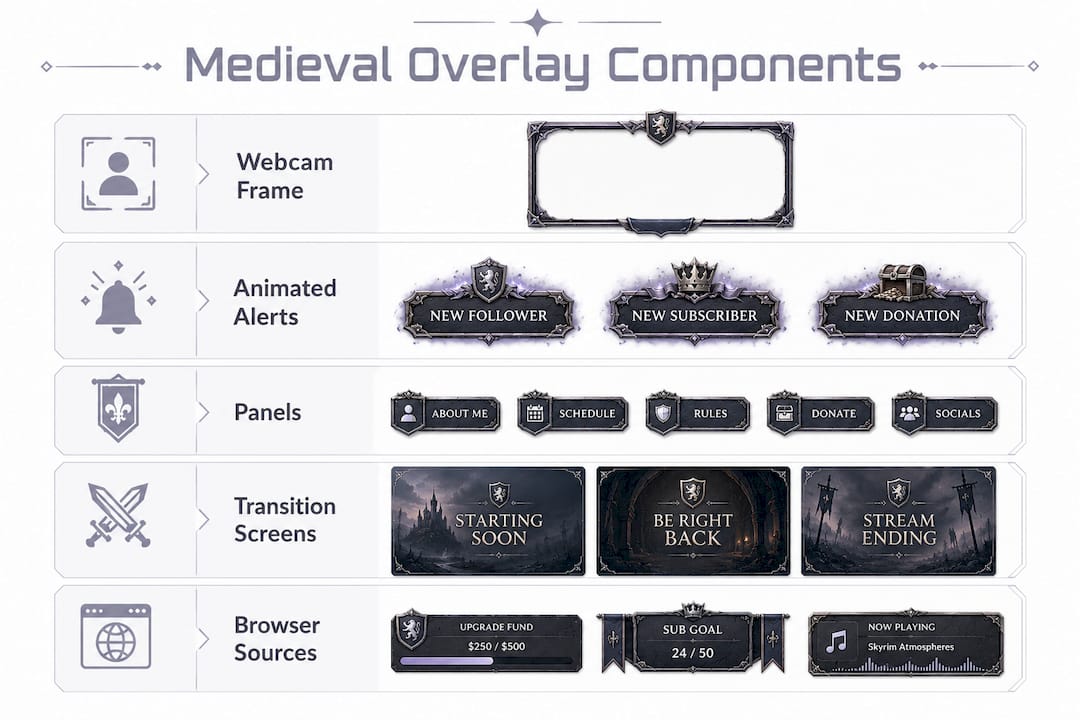
A medieval stream overlay is a complete visual package, not just a single graphic. The standard components found across popular packages from providers like OWN3D and Hexeum cover every visible layer of your stream layout.
The core elements are:
- Webcam frame. A decorative border that surrounds your camera feed. Medieval versions use stone arches, iron filigree, wooden beams, or gothic window shapes. Animated and static variants are common, letting you choose between a living, flickering frame or a clean still image.
- Overlay panels. Branded info blocks for your chat, recent follower, donation goal, and stream schedule. Medieval panels typically use aged parchment textures, wax seals, and gothic script fonts.
- Animated alerts. Pop-up notifications for new followers, subscribers, donations, and raids. Medieval alert packages from OWN3D and StreamSpell include thematic sounds like horn blasts or bell tolls alongside crown and candle animations.
- Transition screens. Starting soon, be right back, intermission, and offline screens that keep your branding consistent even when you step away.
- Banners and overlays. Horizontal bars across the bottom or top of the screen showing your stream title, social handles, or current game.
- Custom widgets. Countdown timers, scoreboards, and goal trackers styled in the medieval theme, typically delivered as browser sources.
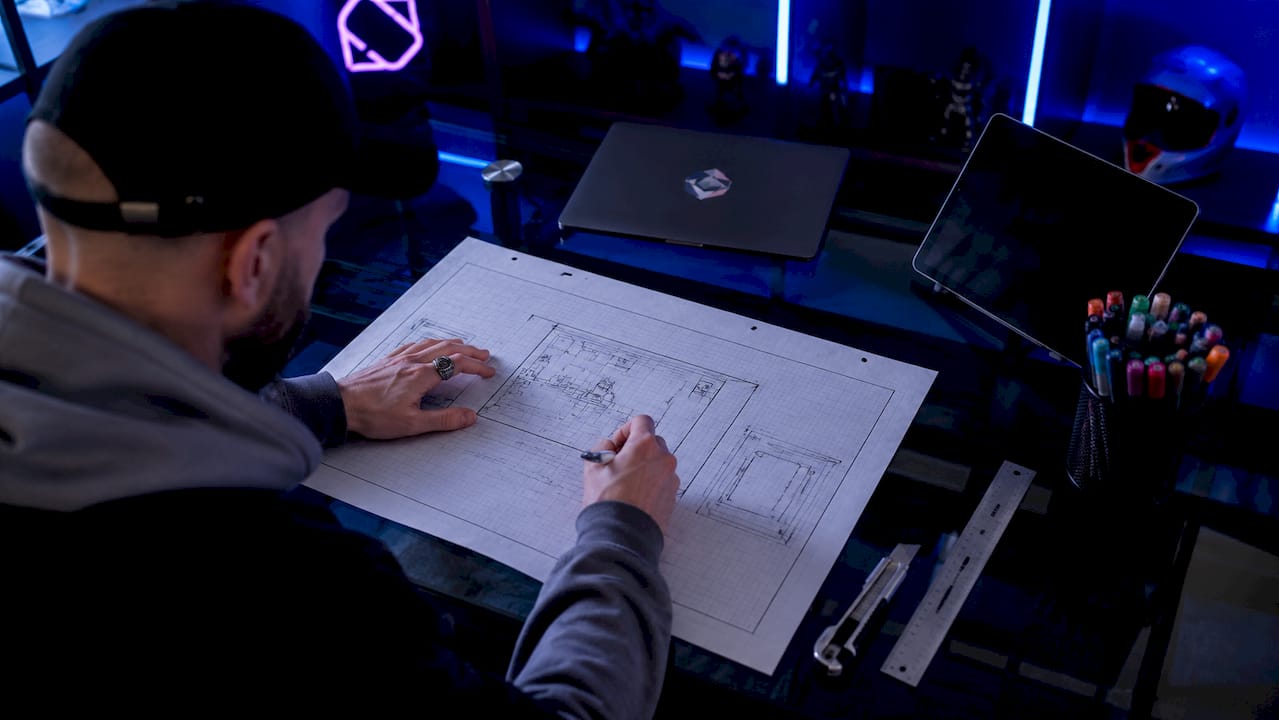
Pro Tip: Before you install anything, sketch your scene layout in OBS Studio first. Knowing where your webcam, game capture, and panels sit helps you choose a package with the right frame shape and panel count.
How do design features and animation enhance medieval overlay immersion?
The visual language of a medieval overlay does the heavy lifting. Viewers form an impression of your stream in seconds, and the right design signals "this is a world worth staying in."
The most effective medieval overlays build atmosphere through these design layers:
- Texture work. Stone, hammered metal, aged wood, and cracked leather form the base. Gothic and dark fantasy textures like these give panels and frames visual weight without looking flat.
- Motifs and iconography. Crowns, crossed swords, candles, ancient scrolls, and Celtic knot work appear as accent details. These small touches signal the theme immediately, even at a glance.
- Subtle animation. Flickering candlelight, drifting smoke, and rotating mechanical effects add motion without pulling the viewer's eye away from your gameplay. The goal is atmosphere, not distraction.
- Layered webcam masking. The webcam frame uses a transparent center cutout. Your camera feed sits underneath it as a separate source. This approach means transparent frame masking keeps alignment consistent even if you change your camera resolution or reposition the feed.
- Color palette. Deep blacks, dark greens, burgundy, aged gold, and iron gray dominate medieval designs. These colors reinforce the mood and make text readable against complex backgrounds.
Pro Tip: Keep your animated elements to two or three per scene. One flickering candle on the webcam frame and one animated alert is plenty. Stacking five animated sources in a single scene tanks your CPU and makes the stream feel chaotic.
What technical features and software compatibility should you expect?
Medieval overlays are built to drop into your existing streaming setup without a rebuild. OBS Studio, Streamlabs, and XSplit all support the file formats and source types these packages use.
| Feature |
Static overlays |
Animated overlays |
Browser source widgets |
| File format |
PNG |
GIF or WebM |
HTML/CSS/JS |
| Software support |
OBS, Streamlabs, XSplit |
OBS, Streamlabs, XSplit |
OBS, Streamlabs |
| Live updates |
No |
No |
Yes |
| CPU load |
Very low |
Low to medium |
Low |
| Customization |
Limited |
Moderate |
High |
Browser sources are the most flexible option. OBS supports HTML/CSS/JS overlays as browser sources, which means your countdown timers, scoreboards, and donation trackers update live without you touching a single setting mid-stream. Static PNG files are the simplest to install but offer no animation. WebM files give you looping animation with a small file size. Most full medieval packages include all three formats so you can mix and match based on your hardware.
Customization depth varies by provider. Many overlay authors supply editable HTML and CSS files, so you can adjust colors and sizing without rebuilding from scratch. Hexeum and OWN3D both allow modifications to bezel thickness, frame size, and color themes like brass, copper, and iron.
What are the best medieval stream overlay themes, and how do you choose?
Medieval is a broad category. The right pack depends on the specific atmosphere your content calls for.
Popular medieval overlay themes include:
- Dark Fantasy / Gothic Castle. Heavy stone textures, candlelight, and deep shadows. Best for horror RPGs, dark fantasy games, or D&D campaigns with a grim tone. If D&D is your main game, we round up the best D&D and fantasy stream overlays with real buyer ratings. The D&D Fantasy Medieval Tavern pack from Neonstreamlab fits this style well, with crown and candle elements built into every asset.
- Celtic / Viking Nordic. Warmer wood tones, runic script, and knot work borders. The Nordic Fantasy Tavern pack from Neonstreamlab covers this angle with Viking-era aesthetics suited to Norse mythology games or historical strategy titles.
- High Fantasy / Royal Court. Gold accents, heraldic crests, and rich jewel tones. Works well for fantasy MMOs or tabletop streams where the tone is epic rather than grim.
When choosing between packages, weigh these factors:
| Factor |
What to check |
| Animation style |
Does it match your game's tone? Flickering candles suit horror; bright gold suits high fantasy. |
| Widget availability |
Does the pack include a chat box, alerts, and panels, or just a webcam frame? |
| Color palette |
Does it complement your game capture or clash with it? |
| File formats included |
Are PNG, GIF, and WebM all included for flexibility? |
| Software compatibility |
Confirm OBS Studio or Streamlabs support before buying. |
Themed overlays aligned with your content increase viewer retention because the visual environment matches the game world. A cohesive stream looks intentional. A mismatched one looks rushed.
Key takeaways
A complete medieval stream overlay includes webcam frames, animated alerts, panels, transition screens, and browser source widgets, all built around a consistent medieval design language.
| Point |
Details |
| Core components |
Webcam frames, panels, alerts, banners, and transition screens form the full package. |
| Animation adds atmosphere |
Flickering candles and subtle motion build immersion without distracting from gameplay. |
| Browser sources enable live updates |
HTML/CSS/JS widgets update scoreboards and timers live without interrupting your stream. |
| Theme matching matters |
Choose dark fantasy, Celtic, or high fantasy based on your game genre and audience. |
| Customization is standard |
Most packs let you adjust colors, sizes, and animation settings to fit your brand. |
What I've learned from building medieval stream setups
The biggest mistake I see streamers make with medieval overlays is treating them like wallpaper. They install the pack, drop every asset into one scene, and wonder why the stream looks cluttered. A medieval overlay works because of restraint, not volume.
The webcam frame is the anchor. Get that right first. A well-chosen stone arch or iron filigree frame instantly signals the theme, and everything else supports it. I've found that one animated alert, one static panel set, and one transition screen is enough to carry the medieval identity across an entire stream without overloading the viewer.
Performance matters more than most creators admit. Lightweight animations and optimized overlay files prevent CPU spikes during live-streaming. A beautiful overlay that drops your frame rate is worse than a plain one. Test your scene with all sources active before you go live, and check your CPU usage in OBS Studio's stats panel.
The best medieval streams I've seen treat the overlay as part of the storytelling. The fonts, the alert sounds, the panel textures all reinforce the world the streamer is playing in. That consistency is what makes viewers feel like they've stepped into a tavern, not just watched someone play a game.
Medieval stream overlays at Neonstreamlab
Neonstreamlab builds animated overlay packs specifically for streamers who want a strong visual identity without spending hours in Photoshop.
The D&D Fantasy Medieval Tavern pack includes webcam frames, animated alerts, panels, and transition screens built for OBS Studio and Streamlabs. Every asset uses original audio, so there are no copyright issues on Twitch, YouTube, or Kick. Neonstreamlab holds a 4.9/5 rating from over 192 streamers. If you want to try before you commit, the free screen makers gives you working assets at no cost, which is a solid way to test the install process and see how the style fits your stream.
FAQ
What does a medieval stream overlay include?
A medieval stream overlay includes webcam frames, overlay panels, animated alerts, transition screens, banners, and custom widgets like timers or scoreboards, all styled with medieval motifs such as crowns, candles, and gothic textures.
Which streaming software supports medieval overlays?
Medieval overlays are compatible with OBS Studio, Streamlabs, and XSplit. Most packages provide PNG, GIF, and WebM files alongside browser source HTML files for live-updating widgets.
How do I add a medieval overlay to OBS Studio?
Add each overlay asset as a separate source in your OBS scene. Use Image sources for PNG files, Media sources for WebM animations, and Browser sources for HTML widgets like timers or chat boxes.
Do medieval overlays affect stream performance?
Lightweight animated overlays have a low CPU impact. Optimized overlay files keep resource usage low, but stacking too many animated browser sources in one scene can cause frame drops. Test your scene before going live.
Can I customize a medieval overlay to match my brand colors?
Yes. Most medieval overlay packs include editable HTML and CSS files, so you can adjust colors, frame sizes, and animation settings. Providers like Hexeum and Neonstreamlab support color theme changes without requiring you to rebuild assets from scratch.
Get matching overlays from NeonStreamLab
At NeonStreamLab we design premium animated overlay packs that already put these principles into practice - balanced colour, clean hierarchy and a cohesive look across screens, alerts, webcam frames and panels. Browse Fantasy & RPG overlays, Horror & Gothic overlays to find a theme that fits your channel, like our Fantasy & RPG pack.
Every pack works with OBS, Streamlabs and StreamElements, uses original copyright-free audio, and downloads instantly. Want to try before you buy? Try our free screen makers and see how a matching look feels on your stream.